


FourKites CarrierLink App
4.82.06K Reviews
App Specs
- Version
- 6.7.28
- Updated On
- License
- Free
- Downloads
- 500,000+
- Developer
- FourKites, Inc.
- Categories
- Maps & Navigation
- Platform
- Android, iOS
Screenshots
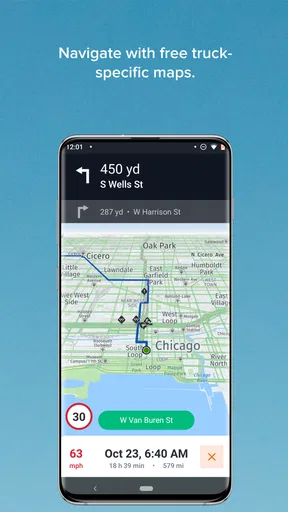
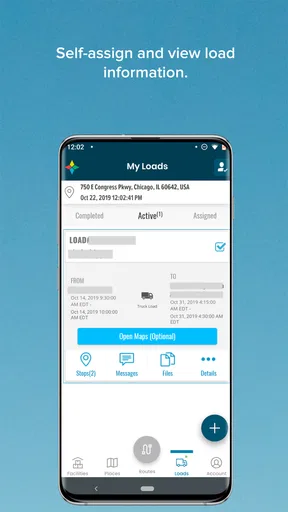
 Analysis by AppCompare
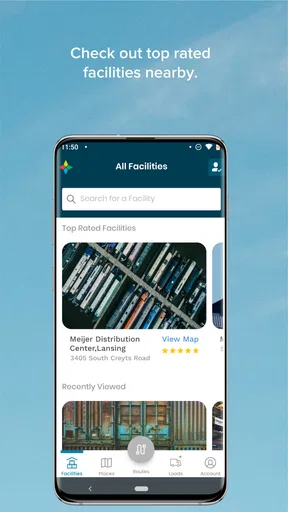
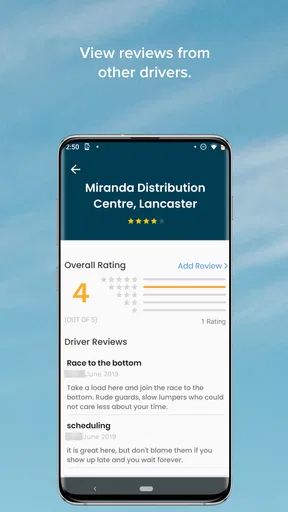
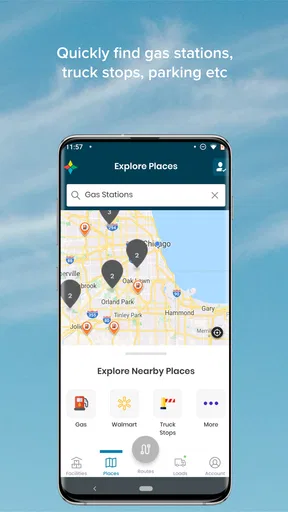
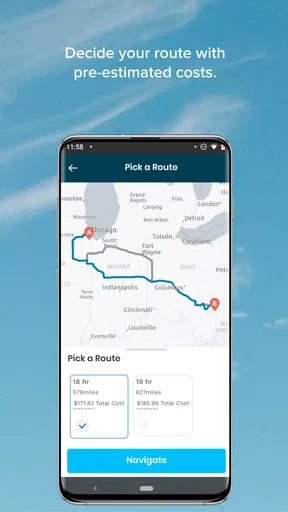
FourKites CarrierLink is a specialized Maps & Navigation app from FourKites, Inc. that makes the most sense when you are a truck driver handling assigned loads and need your movement to be visible to the people coordinating the shipment. I found its purpose refreshingly narrow: it is not trying to replace a full navigation suite, a dispatch platform, or a general road atlas. Its job is to help enable seamless tracking for a load, and that focused role can remove a surprisingly common source of friction in freight work.
That focus also tells you who should consider it. If you drive commercially and your carrier or logistics operation uses FourKites to follow assigned freight, CarrierLink can be a useful part of your daily workflow. If you are a private driver looking for turn-by-turn directions, traffic avoidance, fuel stops, or route planning, this is not the app I would choose. The distinction matters because the name sits in the navigation category, but the experience is closer to a tracking companion for freight operations than a conventional consumer navigation tool.
How CarrierLink fits into a working driver's day
I think CarrierLink makes the most sense as a work tool kept separate from a household’s personal apps: a driver can use it for an assigned load while another person sharing the device should avoid changing the work setup mid-trip. Before a shift, I’d confirm the correct assignment and leave any troubleshooting for when the vehicle is parked. That small boundary helps keep tracking useful without turning a shared phone into a distraction.
A focused tool rather than a replacement for navigation
My first impression is that CarrierLink is built around a relationship between a driver, an assigned load, and the operation watching that load. That makes it valuable in situations where status updates need to happen without a driver repeatedly calling a dispatcher. When the app is being used for its intended purpose, the driver can concentrate on the road while the relevant shipment activity is shared through the tracking workflow.
That is a different problem from finding the fastest route. A navigation app answers, “How do I get there?” CarrierLink addresses, “Where is the assigned load in its journey?” A fleet or shipper may need the second answer even when the driver uses another app for directions. In practice, I would treat the two tools as complementary rather than competing: one helps me drive, while the other helps the freight operation maintain visibility.
The best everyday scenario is a long delivery run with several handoffs in the background. Before leaving, I would make sure the correct load is associated with my work, enable the tracking process, and then keep my attention on driving. A dispatcher or operations team can work from the movement information instead of relying entirely on manual check-in calls. That can be especially helpful when a stop takes longer than expected or when a driver cannot safely answer a phone call.
Who gets the most value from it
CarrierLink is most useful for drivers whose employers, brokers, or customers already depend on FourKites tracking. Its value is not simply that it sits on a phone; it comes from fitting into a larger freight workflow. A driver working independently without a connected load process may find little reason to keep it installed, because the app is not designed to provide the broad set of tools found in a consumer driving app.
Worth Reading Before You Choose

EA SPORTS FC Mobile 26 Is a Bigger Football Game, but It Takes Time

Flipboard Shows What News Apps Must Do Beyond the Feed

Switching to Android Auto Means Rethinking Your Driving Routine

Google Calendar Makes a Crowded Week Easier to Manage

Ludo King Makes the Most of the Minutes Between Plans

Baby Panda World Brings Quick Play to Modern Phones, but Its Game Library Feels Busy
It can also help operations teams indirectly. Better visibility means fewer “where are you now?” interruptions, but only when drivers use the app consistently and the right load is being tracked. That creates an important trade-off: the app can reduce communication overhead, yet it cannot make an inaccurate assignment or an incomplete workflow accurate by itself. The human setup around it still matters.
I would skip it if my main requirement were offline maps, lane guidance, live congestion information, roadside discovery, or trip planning. Those are reasonable expectations from a typical navigation download, but they are not the reason to install this particular app. For a personal road trip, a mainstream navigation service is the better choice. For a freight movement that needs operational visibility, CarrierLink has a much clearer purpose.
Practical habits that make the tracking workflow smoother
One useful habit is to treat load selection as a pre-departure check, much like confirming paperwork or securing the trailer. I would not wait until I was already moving to figure out whether the intended assignment is active. A quick check before pulling away can prevent the most damaging kind of tracking mistake: having the phone running while the wrong shipment is associated with the trip.
A second habit is to keep the app’s role separate from the driver’s primary route tool. If I use CarrierLink for shipment visibility and another app for directions, I would set up the route before departure and avoid switching between screens while driving. This division keeps the tracking task from becoming a distraction and makes it easier to understand which app is responsible for which piece of information.
A third insight is that tracking should be treated as a communication aid, not as permission to ignore normal check-in procedures. If a facility requires a call, a gate procedure, or a documented arrival process, automatic visibility does not necessarily replace those requirements. I would use the app to reduce unnecessary status questions, while still following the carrier’s established instructions for exceptions, delays, and delivery confirmation.
What the current release tells me
The current version is 6.7.28, which suggests this is an established product rather than a brand-new experiment. It has been available since August 12, 2015, giving it a long product history in a field where reliability and routine matter more than flashy presentation. I would still judge the app by how consistently it supports a current load workflow, but its continued presence points to a tool that has had time to mature.
The public response is strong: CarrierLink holds an average rating of 4.8 from around 33 thousand ratings, with roughly 2.1 thousand written reviews. It has also passed half a million installs. Those figures do not prove that every driver will have a smooth experience, but they do indicate that the app has reached a substantial audience and that many people find its core purpose worthwhile.
It is free to install and carries an Everyone content rating, which removes two common barriers for a work tool. The operating-system requirement is Android 7.0 or later, so anyone using an older Android device would need to check compatibility before planning around it. For a company or driver standardizing phones, that minimum is worth considering alongside the age and condition of the devices in the fleet.
How product evolution affects existing users
For someone already using CarrierLink, the most important effect of a mature version number is continuity. A driver usually does not want a tracking tool to change its basic behavior every week; predictable access to the assigned-load workflow is more valuable than constant novelty. When updating, I would pay attention to whether the normal sequence still feels familiar: open the app, identify the relevant assignment, enable or maintain tracking, and get back to the road.
At the same time, an updated version can expose a practical issue that is easy to overlook. If a phone has been used for years, the problem may not be the app itself but the device’s battery health, background activity settings, or general stability. Tracking tools depend on the phone being available throughout the trip. I would therefore test the workflow on the actual handset used in the cab instead of assuming that a successful installation means the job is finished.
Existing users should also think about update timing. I would avoid making the first test of a new installation or update the same morning as an important delivery. Opening the app while parked, checking the assigned workflow, and confirming that the driver understands the current routine is a small investment that can prevent confusion later. That advice is less about a specific feature and more about respecting the consequences of a tracking gap.
The strong rating is encouraging, but it should not be read as a guarantee that the app will fit every carrier’s process. A driver may have a good experience with the app while still encountering problems caused by an incorrect assignment, a phone setting, or a company procedure. My recommendation is to judge the complete chain: correct load, correct device, clear instructions, and regular use. CarrierLink is one part of that chain.
Where the app still feels limited
The biggest limitation is its narrow scope. I would not want to depend on it as my only driving application because shipment tracking and route guidance are different jobs. A driver who expects maps, detailed directions, or trip-planning tools may open CarrierLink and feel that it does not do enough. That is not necessarily a flaw in its intended design, but it is a real mismatch if the app is chosen from the navigation category without understanding its freight-specific purpose.
Another limitation is the dependence on operational context. The app is more useful when the assigned load and tracking expectations are clear. A person cannot create a complete logistics workflow simply by downloading it. If the carrier has not connected the driver to the relevant process, the app’s practical value may be limited even though the installation itself is straightforward.
There is also a human-factors issue. Any app used during a driving shift must be handled before moving or while safely parked. Tracking may be seamless from the operations perspective, but the driver still needs to avoid unnecessary interaction with the phone. I would be cautious about any workflow that encourages repeated manual checking, especially in heavy traffic, at a customer entrance, or during a difficult maneuver.
Finally, I would not confuse a high rating with universal suitability. The people rating CarrierLink are likely judging it against a freight-tracking need, not against a full navigation package. If my work does not involve assigned loads that need this kind of visibility, the app may add another icon and another process without giving me a meaningful benefit.
Questions I would settle before relying on it
Would I use it alongside another navigation app? Yes. That is probably the most sensible arrangement for many drivers. I would let a dedicated navigation service handle directions and use CarrierLink for the shipment-tracking role. Keeping those responsibilities separate makes the setup easier to understand and reduces the temptation to force one app to do everything.
Would I install it on an older Android phone? Only after checking that the device runs Android 7.0 or newer and that it remains dependable during a full shift. Compatibility is the first filter, but practical reliability matters just as much. A phone that frequently closes apps or struggles with battery life is a weak foundation for any tracking workflow.
Is it suitable for a private car driver? In my view, usually not. The app’s value is tied to assigned freight and the people coordinating that freight. For commuting, errands, holidays, or ordinary road trips, a standard navigation app will offer a more relevant set of tools and a more natural experience.
Can it replace calls and messages with dispatch? I would not assume that. It can make location visibility more continuous, which may reduce routine status requests, but exceptions still need human communication. Delays, access problems, damaged freight, a changed appointment, or an incorrect assignment should be handled through the carrier’s normal process rather than left to an app to interpret.
What should I watch as the product continues to evolve? I would look for improvements that protect the driver’s attention, make assignment status clearer, and keep the basic tracking routine dependable across current devices. Those changes would matter more to me than cosmetic redesigns. For this kind of tool, the best evolution is usually the one that makes the correct action obvious before departure and stays out of the way afterward.
My recommendation for drivers and freight teams
I see FourKites CarrierLink as a practical specialist rather than a general-purpose navigation app. Its strength is the simple idea of keeping an assigned load visible while the driver gets on with the journey. The long availability history, current 6.7.28 release, free price, and strong user response make it an easy app to consider when a carrier already works with FourKites.
My recommendation is conditional but positive: use it when your freight workflow calls for FourKites tracking, prepare the correct load before moving, and keep a separate navigation tool for directions. Do not install it expecting a complete road-driving assistant. The real benefit is fewer routine visibility gaps, not a replacement for dispatch, maps, or good driving procedure.
For the right driver, that distinction is exactly why the app works. It does not need to be a universal tool; it needs to support one important part of a commercial trip without demanding constant attention. If that is the problem you are trying to solve, CarrierLink is worth considering. If it is not, I would choose a conventional navigation app and leave this freight-focused option to the workflows it was built to support.
Pros
- Real-time shipment visibility helps carriers track loads and delivery progress.
- Digital document sharing can reduce paperwork and speed up administrative tasks.
- Push notifications keep drivers informed about status changes and updates.
- Centralized load details make trip information easier to access on the road.
- Useful for improving communication between carriers
- shippers
- and receivers.
Cons
- Requires compatible FourKites access from a participating shipper or carrier.
- Some features may depend on GPS
- mobile data
- and stable network coverage.
- Frequent notifications could become distracting during busy delivery periods.
- The interface may feel complex for drivers unfamiliar with logistics platforms.
- Battery and data usage can increase when location tracking stays enabled.
FAQs for FourKites CarrierLink App
What is the FourKites CarrierLink app used for?
FourKites CarrierLink is a mobile tool designed for carriers and drivers who manage shipments through the FourKites logistics platform. It can help users view assigned loads, receive shipment updates, share location information, communicate with relevant logistics teams, and complete delivery-related tasks. The exact features available may depend on the carrier’s FourKites account, customer requirements, user permissions, and the type of shipment being handled.
Who can use FourKites CarrierLink, and is an account required?
The app is primarily intended for transportation carriers, dispatchers, and professional drivers working with companies that use FourKites for supply-chain visibility. In most cases, users need an invitation, login credentials, or an activation process provided by their carrier or logistics partner. It is not generally a consumer delivery-tracking app, so downloading it alone may not provide access unless your company or customer has already enabled your account.
Does FourKites CarrierLink use GPS or location tracking?
Location services may be used to provide shipment visibility, estimated arrival information, and status updates while a load is in transit. Depending on the company’s configuration, the app may request location access while it is being used or, in some situations, in the background. Drivers should review the permission prompts and their employer’s tracking policy carefully. Location accuracy can also be affected by weak signals, battery-saving settings, or limited device connectivity.
Can drivers use the app to update shipment status and communicate with dispatch?
CarrierLink may allow drivers or authorized carrier personnel to report milestones such as arrival, pickup, departure, delivery, delays, or other shipment events. Some configurations can also support messaging, document sharing, notifications, and instructions connected with a load. Available tools vary by account and customer workflow, so users should not assume every feature will appear. The app should complement, rather than replace, any required calls or procedures from dispatch.
What should I check before downloading and using FourKites CarrierLink?
Before installing the app, confirm that your carrier, broker, or shipping customer actually uses FourKites and has provided the correct sign-in or invitation details. Check that your Android or iPhone meets the current app requirements, that you have reliable mobile data, and that location and notification permissions are available when needed. Also review privacy, battery, and data-use implications, particularly if background location tracking is required during active shipments.


